Identify your machine brand
Format choice starts with your machine. Brother → PES. Janome/Elna → JEF. Husqvarna Viking/Pfaff → VP3. Tajima and most commercial systems → DST. If you are ordering from a commercial shop, ask which format they prefer.
 StitchPilot.ai
Format guide · PES · DST · JEF · VP3
PES, DST, JEF, and VP3 are the four most common embroidery file formats. Each was developed for a specific machine ecosystem and has different strengths. This guide explains key differences to help you choose the right format for your machine, workflow, and production context.
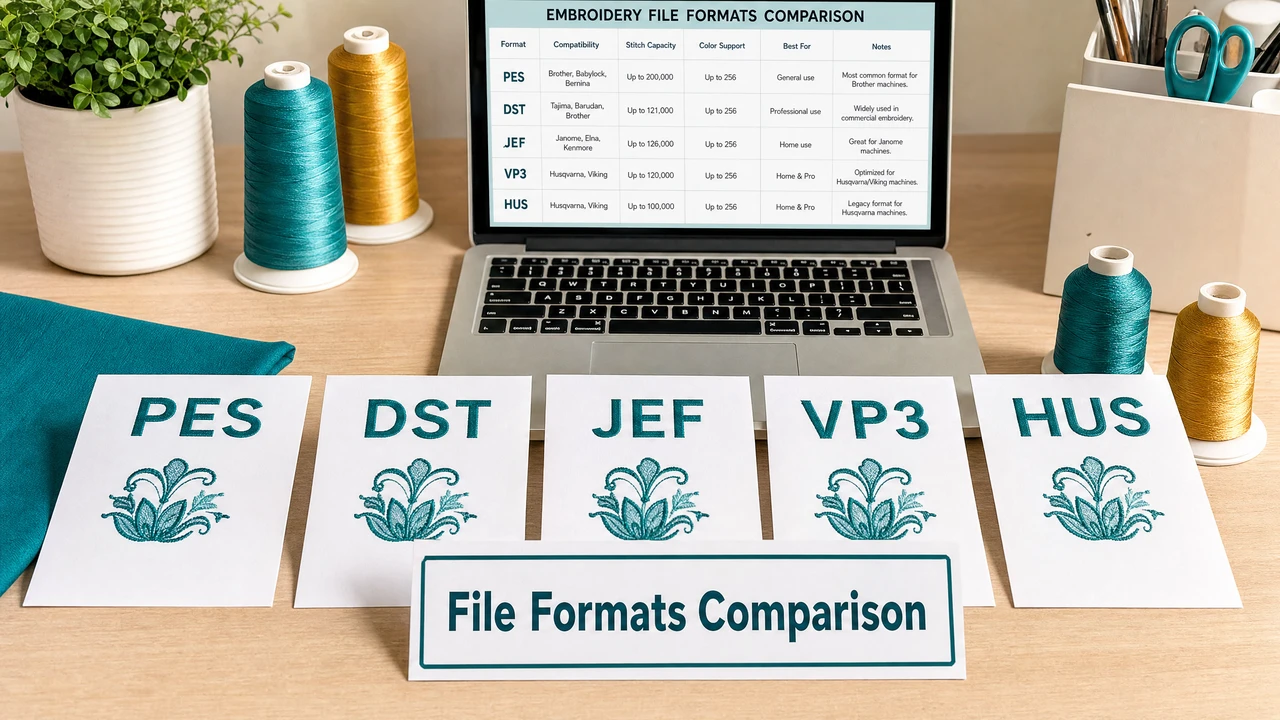
How to choose the right format
Format choice starts with your machine. Brother → PES. Janome/Elna → JEF. Husqvarna Viking/Pfaff → VP3. Tajima and most commercial systems → DST. If you are ordering from a commercial shop, ask which format they prefer.
VP3 and JEF embed color metadata alongside stitch data, giving viewers and software more to work with. DST records color-change stops but not color names. PES stores color sequences. All formats require a separate color reference sheet for commercial orders.
Each format and machine combination has stitch count, color change, and design area limits. Confirm your design fits within the constraints of your specific machine model before exporting.
Use StitchPilot.ai to convert your artwork to the required format, preview the result, and verify scale and color placement. Always run a test stitch on scrap fabric before committing to production material.
Format summary
PES: Brother/Babylock, rich metadata, multiple versions. DST: commercial/industrial standard, no color names embedded. JEF: Janome/Elna, includes hoop metadata, JEF+ for larger hoops. VP3: Viking/Pfaff, rich color metadata, semi-professional to professional use.
When formats overlap
If you are sending work to a commercial embroidery shop, DST is the safest choice regardless of format. Most commercial shops run Tajima or similar DST-compatible systems. For personal machine use, always use the format native to your machine for the best compatibility.
Format comparison — common questions
Choose the format required by your machine: PES for Brother, JEF for Janome and Elna, VP3 for Husqvarna Viking and Pfaff, DST for most commercial and Tajima systems. If in doubt, ask your machine vendor or production contact.
DST is the most widely supported format across commercial and industrial machines. Most consumer machines can also read DST, but for home machines it is usually better to use the native format (PES, JEF, or VP3) for full compatibility and color sequence support.
VP3 and JEF store more metadata than DST, including color information and hoop size data. PES stores color sequences but varies in richness by version. DST is the most basic — it stores stitch coordinates and color-change stops only.
Yes. StitchPilot.ai can convert source artwork (PNG, JPG, SVG, WebP) into PES, DST, JEF, or VP3 format. For converting an existing embroidery file from one format to another, use dedicated embroidery software.
DST is almost always accepted by commercial embroidery shops. Provide a color sequence sheet alongside the DST file, specifying thread brand and color codes for each color change in the design.
Ready to get started?
Upload PNG, JPG, SVG, or WebP artwork and export to PES, DST, JEF, or VP3 — ready for your machine or production partner.
Start converting →